
BookBrew
BookBrew avec wasm et typst permettant l’utilisation sur des serveurs plus simple et léger le but reste le même : Interface en ligne de mise en page avec export en PDF imposé (prêt à l’impression), pensée pour les contraintes spécifiques des mémoires et thèses en SHS.
Installer BRAT : Cliquez ici.
Ajouter notre plugin : Utilisez l’option « Add Beta plugin » avec l’URL GitHub.
📸 Aperçu
| Options de mise en page | Aperçu PDF |
|---|---|
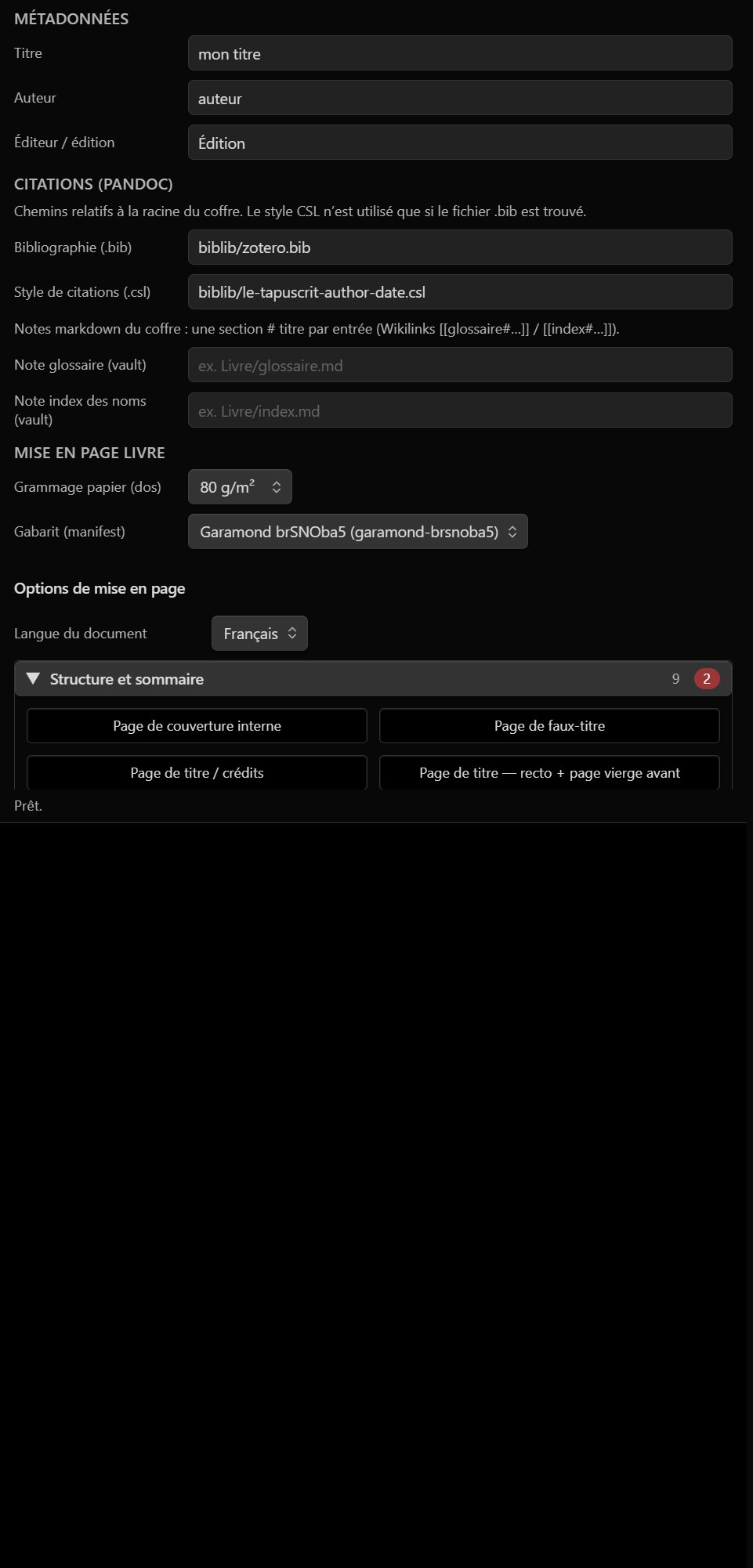 |
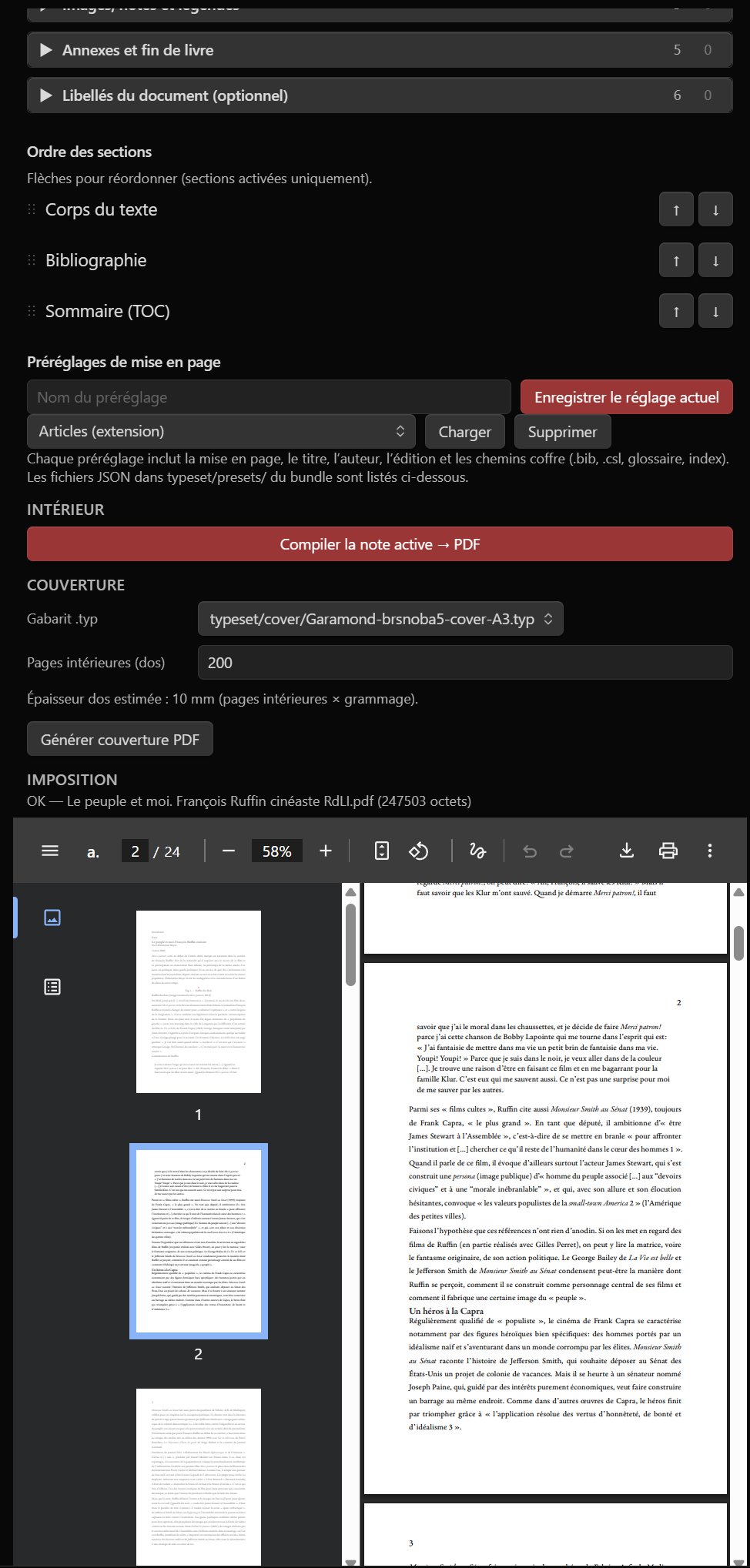 |
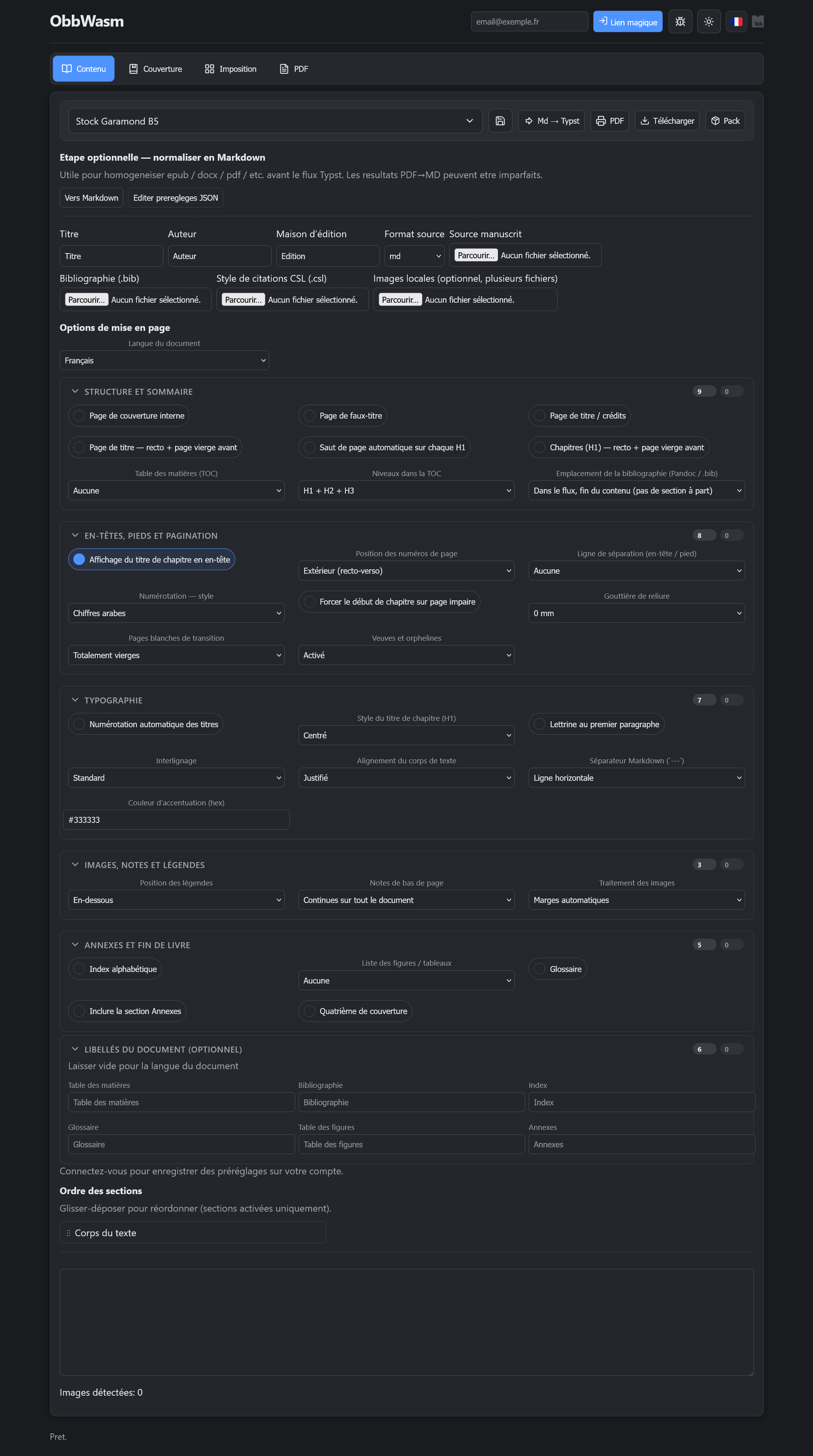
Application web (React + Vite) — même pipeline WASM
📖 À propos
BookBrew (dépôt obbwasm) est un studio de composition et de préparation à l’impression, avec un pipeline 100 % WebAssembly dans le navigateur (et dans Obsidian) :
- 📝 Conversion documentaire via Pandoc WASM
- 📐 Composition typographique via Typst WASM
- 👁️ Aperçu PDF via pdf.js
- 🌐 Application web React + Vite et plugin Obsidian partageant le cœur
@obbwasm/core - 🗄️ API utilitaire optionnelle en PHP + JSON (projets, gabarits, préréglages)
Aucune installation locale de Pandoc ou Typst n’est requise pour le flux principal.
⬇️ Plugin Obsidian (BRAT)
- 🔌 Installer BRAT : Obsidian — BRAT
-
➕ Ajouter ce dépôt avec l’option « Add Beta plugin » :
https://github.com/Atelier-Recherche/obbwasm
(dossier plugin :obsidian-plugin/— voir le workflow de release pour les assetsmain.js,manifest.json,styles.css, WASM) - 📥 Télécharger les gabarits Typst depuis les réglages du plugin (ou pointer vers un dossier
typeset/local).
💡 Compilation d’une note Markdown active → PDF intérieur, couverture, imposition ; préréglages de mise en page ; glossaire et index des noms.
⚙️ Fonctionnement
| Composant | Rôle |
|---|---|
| Pandoc WASM | Markdown (+ bibliographie .bib / CSL) → Typst |
| Typst WASM | Gabarits typeset/ (Garamond, imposition, couverture) → PDF |
| Médias | Images locales, URLs distantes (WebP → PNG), images base64 extraites |
| Plugin | Coffre Obsidian, préréglages JSON, aperçu PDF redimensionnable |
📱 Le plugin cible Obsidian bureau (Windows, macOS, Linux) ; l’app web tourne dans tout navigateur récent.
💻 Développement local
Prérequis : Node.js 20+, npm 10+, PHP 8.2+ (API optionnelle).
npm installApplication web
npm run dev -w webFrontend : http://localhost:5173 — API par défaut : http://127.0.0.1:8088/api.
# API PHP (racine du dépôt)
php -S 127.0.0.1:8088 -t app
Build production :
npm run build -w webPlugin Obsidian
npm run build -w @obbwasm/core
npm run build -w obsidian-plugin
Copie locale vers le coffre : script deployplugin.ps1 (à adapter selon votre chemin vault).
Release plugin (semver + tag → GitHub Actions) : Release-Plugin.ps1.
📁 Structure du dépôt
obbwasm/
  packages/obbwasm-core/   # Pandoc/Typst WASM, options livre, médias
  obsidian-plugin/         # Extension Obsidian
  web/                     # Interface React
  typeset/                 # Gabarits Typst (layout, couverture, imposition)
  app/                     # API PHP + données JSON
  readme-media/            # Captures pour ce README
🚀 Déploiement
Option A (recommandée) : frontend statique (web/dist) + API PHP (app/api, app/data).
VITE_API_BASE="https://example.com/api" npm run build -w webOption B : serveur PHP unique — copier web/dist dans app/public, servir avec php -S ou Apache/Nginx.
Déploiement gabarits + site : voir deploy.ps1 à la racine.
Conformité catalogue Obsidian (plugin)
| Élément | Détail |
|---|---|
| ID plugin | obbwasm-book |
| Licence | MIT — LICENSE |
| Réseau | Oui — téléchargement optionnel de gabarits Typst depuis GitHub (configurable) ; images distantes dans les documents si présentes dans le Markdown |
| Fichiers hors vault | accès aux fichiers du coffre Obsidian pour la composition |
| Télémétrie / mise à jour auto | non |
| Release | .\Release-Plugin.ps1 |
⚠️ Notes
pandoc.wasmettypst_ts_web_compiler_bg.wasmsont volumineux ; chargement à la demande.- Les gros documents peuvent prendre plusieurs minutes à compiler (Pandoc puis Typst) ; l’interface affiche une progression.
- L’endpoint
render-typst.phpreste disponible pour du debug serveur ; le flux principal est WASM côté client.
🔗 Ressources
| 🌐 l’Atelier | atelier.atechnologie.fr |
| 📦 Dépôt | github.com/Atelier-Recherche/obbwasm |
| 📄 Pandoc | pandoc.org |
| 📐 Typst | typst.app |
| 🔌 Obsidian | obsidian.md |
📸 Vorschau
| Layout-Optionen | PDF-Vorschau |
|---|---|
|
|
Web-App (React + Vite) — dieselbe WASM-Pipeline
📖 Über das Projekt
BookBrew (Repository obbwasm) ist ein Studio für Buchgestaltung und Druckvorbereitung mit einer 100 % WebAssembly-Pipeline im Browser (und in Obsidian):
- 📝 Dokumentenkonvertierung über Pandoc WASM
- 📐 Satz mit Typst WASM
- 👁️ PDF-Vorschau über pdf.js
- 🌐 React + Vite Web-App und Obsidian-Plugin mit gemeinsamem Kern
@obbwasm/core - 🗄️ Optionale PHP + JSON-Hilfs-API (Projekte, Vorlagen, Voreinstellungen)
Für den Hauptworkflow sind keine lokale Pandoc- oder Typst-Installation nötig.
⬇️ Obsidian-Plugin (BRAT)
- 🔌 BRAT installieren: Obsidian — BRAT
-
➕ Dieses Repository mit „Add Beta plugin“ hinzufügen:
https://github.com/Atelier-Recherche/obbwasm
(Plugin-Ordner:obsidian-plugin/— Release-Workflow fürmain.js,manifest.json,styles.css, WASM) - 📥 Typst-Vorlagen in den Plugin-Einstellungen herunterladen (oder lokalen
typeset/-Ordner angeben).
💡 Aktive Markdown-Notiz kompilieren → Innen-PDF, Umschlag, Imposition; Layout-Voreinstellungen; Glossar und Namensindex.
⚙️ Funktionsweise
| Komponente | Aufgabe |
|---|---|
| Pandoc WASM | Markdown (+ .bib-Bibliographie / CSL) → Typst |
| Typst WASM | typeset/-Vorlagen (Garamond, Imposition, Umschlag) → PDF |
| Medien | Lokale Bilder, Remote-URLs (WebP → PNG), extrahierte Base64-Bilder |
| Plugin | Obsidian-Tresor, JSON-Voreinstellungen, größenverstellbare PDF-Vorschau |
📱 Das Plugin richtet sich an Obsidian Desktop (Windows, macOS, Linux); die Web-App läuft in jedem aktuellen Browser.
💻 Lokale Entwicklung
Voraussetzungen: Node.js 20+, npm 10+, PHP 8.2+ (optionale API).
npm installWebanwendung
npm run dev -w webFrontend: http://localhost:5173 — Standard-API: http://127.0.0.1:8088/api.
# PHP-API (Repository-Wurzel)
php -S 127.0.0.1:8088 -t app
Produktions-Build:
npm run build -w webObsidian-Plugin
npm run build -w @obbwasm/core
npm run build -w obsidian-plugin
In den Tresor kopieren: Skript deployplugin.ps1 (Vault-Pfad anpassen).
Plugin-Release (Semver + Tag → GitHub Actions): Release-Plugin.ps1.
📁 Repository-Struktur
obbwasm/
  packages/obbwasm-core/   # Pandoc/Typst WASM, Buchoptionen, Medien
  obsidian-plugin/         # Obsidian-Erweiterung
  web/                     # React-Oberfläche
  typeset/                 # Typst-Vorlagen (Layout, Umschlag, Imposition)
  app/                     # PHP-API + JSON-Daten
  readme-media/            # Screenshots für dieses README
🚀 Bereitstellung
Option A (empfohlen): statisches Frontend (web/dist) + PHP-API (app/api, app/data).
VITE_API_BASE="https://example.com/api" npm run build -w webOption B: einzelner PHP-Server — web/dist nach app/public kopieren, mit php -S oder Apache/Nginx bedienen.
Vorlagen + Site: siehe deploy.ps1 im Repository-Wurzelverzeichnis.
⚠️ Hinweise
pandoc.wasmundtypst_ts_web_compiler_bg.wasmsind groß; sie werden bei Bedarf geladen.- Große Dokumente können mehrere Minuten zum Kompilieren brauchen (Pandoc, dann Typst); die Oberfläche zeigt den Fortschritt.
- Der Endpunkt
render-typst.phpbleibt für Server-Debug verfügbar; der Hauptfluss ist clientseitiges WASM.
🔗 Ressourcen
| 🌐 l’Atelier | atelier.atechnologie.fr |
| 📦 Repository | github.com/Atelier-Recherche/obbwasm |
| 📄 Pandoc | pandoc.org |
| 📐 Typst | typst.app |
| 🔌 Obsidian | obsidian.md |
📸 Preview
| Layout options | PDF preview |
|---|---|
|
|
Web app (React + Vite) — same WASM pipeline
📖 About
BookBrew (repository obbwasm) is a composition and print-preparation studio with a 100% WebAssembly pipeline in the browser (and in Obsidian):
- 📝 Document conversion via Pandoc WASM
- 📐 Typesetting via Typst WASM
- 👁️ PDF preview via pdf.js
- 🌐 React + Vite web app and Obsidian plugin sharing the
@obbwasm/corepackage - 🗄️ Optional PHP + JSON utility API (projects, templates, presets)
No local Pandoc or Typst installation is required for the main workflow.
⬇️ Obsidian plugin (BRAT)
- 🔌 Install BRAT: Obsidian — BRAT
-
➕ Add this repository with “Add Beta plugin”:
https://github.com/Atelier-Recherche/obbwasm
(plugin folder:obsidian-plugin/— see the release workflow formain.js,manifest.json,styles.css, WASM assets) - 📥 Download Typst templates from the plugin settings (or point to a local
typeset/folder).
💡 Compile the active Markdown note → interior PDF, cover, imposition; layout presets; glossary and name index.
⚙️ How it works
| Component | Role |
|---|---|
| Pandoc WASM | Markdown (+ .bib bibliography / CSL) → Typst |
| Typst WASM | typeset/ templates (Garamond, imposition, cover) → PDF |
| Media | Local images, remote URLs (WebP → PNG), extracted base64 images |
| Plugin | Obsidian vault, JSON presets, resizable PDF preview |
📱 The plugin targets Obsidian desktop (Windows, macOS, Linux); the web app runs in any recent browser.
💻 Local development
Requirements: Node.js 20+, npm 10+, PHP 8.2+ (optional API).
npm installWeb application
npm run dev -w webFrontend: http://localhost:5173 — default API: http://127.0.0.1:8088/api.
# PHP API (repository root)
php -S 127.0.0.1:8088 -t app
Production build:
npm run build -w webObsidian plugin
npm run build -w @obbwasm/core
npm run build -w obsidian-plugin
Copy to your vault: deployplugin.ps1 script (adjust your vault path).
Plugin release (semver + tag → GitHub Actions): Release-Plugin.ps1.
📁 Repository structure
obbwasm/
  packages/obbwasm-core/   # Pandoc/Typst WASM, book options, media
  obsidian-plugin/         # Obsidian extension
  web/                     # React UI
  typeset/                 # Typst templates (layout, cover, imposition)
  app/                     # PHP API + JSON data
  readme-media/            # Screenshots for this README
🚀 Deployment
Option A (recommended): static frontend (web/dist) + PHP API (app/api, app/data).
VITE_API_BASE="https://example.com/api" npm run build -w webOption B: single PHP server — copy web/dist into app/public, serve with php -S or Apache/Nginx.
Templates + site deployment: see deploy.ps1 at the repository root.
⚠️ Notes
pandoc.wasmandtypst_ts_web_compiler_bg.wasmare large; they load on demand.- Large documents may take several minutes to compile (Pandoc then Typst); the UI shows progress.
- The
render-typst.phpendpoint remains available for server-side debugging; the main flow is client-side WASM.
🔗 Resources
| 🌐 l’Atelier | atelier.atechnologie.fr |
| 📦 Repository | github.com/Atelier-Recherche/obbwasm |
| 📄 Pandoc | pandoc.org |
| 📐 Typst | typst.app |
| 🔌 Obsidian | obsidian.md |
📸 Vista previa
| Opciones de maquetación | Vista previa PDF |
|---|---|
|
|
Aplicación web (React + Vite) — mismo pipeline WASM
📖 Acerca del proyecto
BookBrew (repositorio obbwasm) es un estudio de composición y preparación de impresión con un pipeline 100 % WebAssembly en el navegador (y en Obsidian):
- 📝 Conversión documental con Pandoc WASM
- 📐 Composición tipográfica con Typst WASM
- 👁️ Vista previa PDF con pdf.js
- 🌐 Aplicación web React + Vite y plugin Obsidian que comparten el núcleo
@obbwasm/core - 🗄️ API auxiliar opcional en PHP + JSON (proyectos, plantillas, preajustes)
No se requiere instalar Pandoc ni Typst localmente para el flujo principal.
⬇️ Plugin Obsidian (BRAT)
- 🔌 Instalar BRAT: Obsidian — BRAT
-
➕ Añadir este repositorio con « Add Beta plugin »:
https://github.com/Atelier-Recherche/obbwasm
(carpeta del plugin:obsidian-plugin/— ver el workflow de release paramain.js,manifest.json,styles.css, WASM) - 📥 Descargar las plantillas Typst desde los ajustes del plugin (o apuntar a una carpeta
typeset/local).
💡 Compilar la nota Markdown activa → PDF interior, cubierta, imposición; preajustes de maquetación; glosario e índice de nombres.
⚙️ Funcionamiento
| Componente | Función |
|---|---|
| Pandoc WASM | Markdown (+ bibliografía .bib / CSL) → Typst |
| Typst WASM | Plantillas typeset/ (Garamond, imposición, cubierta) → PDF |
| Medios | Imágenes locales, URL remotas (WebP → PNG), imágenes base64 extraídas |
| Plugin | Bóveda Obsidian, preajustes JSON, vista previa PDF redimensionable |
📱 El plugin está pensado para Obsidian de escritorio (Windows, macOS, Linux); la app web funciona en cualquier navegador reciente.
💻 Desarrollo local
Requisitos: Node.js 20+, npm 10+, PHP 8.2+ (API opcional).
npm installAplicación web
npm run dev -w webFrontend: http://localhost:5173 — API por defecto: http://127.0.0.1:8088/api.
# API PHP (raíz del repositorio)
php -S 127.0.0.1:8088 -t app
Build de producción:
npm run build -w webPlugin Obsidian
npm run build -w @obbwasm/core
npm run build -w obsidian-plugin
Copia al vault: script deployplugin.ps1 (adaptar la ruta del vault).
Release del plugin (semver + tag → GitHub Actions): Release-Plugin.ps1.
📁 Estructura del repositorio
obbwasm/
  packages/obbwasm-core/   # Pandoc/Typst WASM, opciones de libro, medios
  obsidian-plugin/         # Extensión Obsidian
  web/                     # Interfaz React
  typeset/                 # Plantillas Typst (maquetación, cubierta, imposición)
  app/                     # API PHP + datos JSON
  readme-media/            # Capturas para este README
🚀 Despliegue
Opción A (recomendada): frontend estático (web/dist) + API PHP (app/api, app/data).
VITE_API_BASE="https://example.com/api" npm run build -w webOpción B: servidor PHP único — copiar web/dist en app/public, servir con php -S o Apache/Nginx.
Plantillas + sitio: ver deploy.ps1 en la raíz del repositorio.
⚠️ Notas
pandoc.wasmytypst_ts_web_compiler_bg.wasmson grandes; se cargan bajo demanda.- Los documentos largos pueden tardar varios minutos en compilarse (Pandoc y luego Typst); la interfaz muestra el progreso.
- El endpoint
render-typst.phpsigue disponible para depuración en servidor; el flujo principal es WASM en el cliente.
🔗 Recursos
| 🌐 l’Atelier | atelier.atechnologie.fr |
| 📦 Repositorio | github.com/Atelier-Recherche/obbwasm |
| 📄 Pandoc | pandoc.org |
| 📐 Typst | typst.app |
| 🔌 Obsidian | obsidian.md |