
Universal Timestamp
Un plugin Obsidian pour prendre des notes pendant une session enregistrée (audio ou vidéo) en générant des horodatages universels basés sur l’horloge système. Une fois l’enregistrement importé, les horodatages sont convertis en liens #t= cliquables.
Installer BRAT : Cliquez ici.
Ajouter notre plugin : Utilisez l’option « Add Beta plugin » avec l’URL GitHub.
📸 Aperçu
📖 À propos
Plugin Obsidian pour prendre des notes pendant une session enregistrée (audio ou vidéo) en générant des horodatages universels basés sur l’horloge système. Une fois l’enregistrement importé, les horodatages sont convertis en liens #t= cliquables.
Note : le plugin n’enregistre pas l’audio. Il se concentre sur la prise de notes et la synchronisation temporelle avec un enregistrement externe. Sur Android, android-audio-recorder convient bien pour l’enregistrement.
🌟 Fonctionnalités
- 📝 Horodatages universels :
Ctrl+Shift+Tinsère un marqueur horodaté (%%REC{...}%%) accompagné d’un libellé lisible. - 🔗 Conversion contrôlée : commande « Associer un fichier audio aux horodatages » pour transformer les marqueurs en liens
[[fichier#t=123|[02:03]]]. - 🔔 Proposition contextuelle : lorsqu’un lien vers un fichier audio est inséré dans la note, le plugin peut proposer immédiatement de lancer la conversion (aucune action forcée).
- 📂 Reconnaissance des fichiers : détection automatique des fichiers audio (MP3, WAV, M4A, OGG, WebM, MP4, AAC, FLAC) déjà présents dans le coffre.
- ⚙️ Paramètres épurés : format du libellé
{time}, affichage ou non des secondes, notifications.
⬇️ Installation via BRAT (1 clic)
ID du plugin (catalogue Obsidian) :
universal-timestamp— le dossier dans.obsidian/plugins/doit s’appeleruniversal-timestamp.
- 🔌 Installer BRAT : Obsidian — BRAT
- ➕ Ajouter ce dépôt avec l’option « Add Beta plugin » :
https://github.com/Atelier-Recherche/Universal-Timestamp
💡 Nos plugins peuvent être en attente de validation sur le catalogue Obsidian ; BRAT permet de les tester dès maintenant. Voir aussi 🌐 l’Atelier.
Installation manuelle
- Téléchargez les fichiers
main.js,manifest.jsonetstyles.css - Créez un dossier
universal-timestampdans.obsidian/plugins/ - Placez les fichiers téléchargés dans ce dossier
- Redémarrez Obsidian
- Activez le plugin dans les paramètres
🚀 Utilisation
1. Pendant la prise de notes
- À chaque repère temporel souhaité, utilisez la commande « Insérer un horodatage universel » (
Ctrl+Shift+Tpar défaut). - Un placeholder du type
%%REC{"time":"2025-11-08T16:32:23.123Z"}%%[16:32:23]est inséré à l’emplacement du curseur.
2. Après l’enregistrement
- Copiez ou importez le fichier audio/vidéo dans votre coffre Obsidian.
- Si le fichier possède un nom incluant la date/heure de démarrage (
2025-11-07 16.32.23.m4a, par exemple), le plugin pré-remplira automatiquement l’heure de début.
3. Conversion des horodatages
- Ouvrez la note contenant vos placeholders.
- Lancez la commande « Associer un fichier audio aux horodatages ».
- Choisissez le fichier audio à lier.
- Ajustez l’heure de démarrage si nécessaire (format
YYYY-MM-DD HH:mm:ss).
- Tous les placeholders référencés sont remplacés par des liens
#t=cliquables.
Suggestions contextuelles
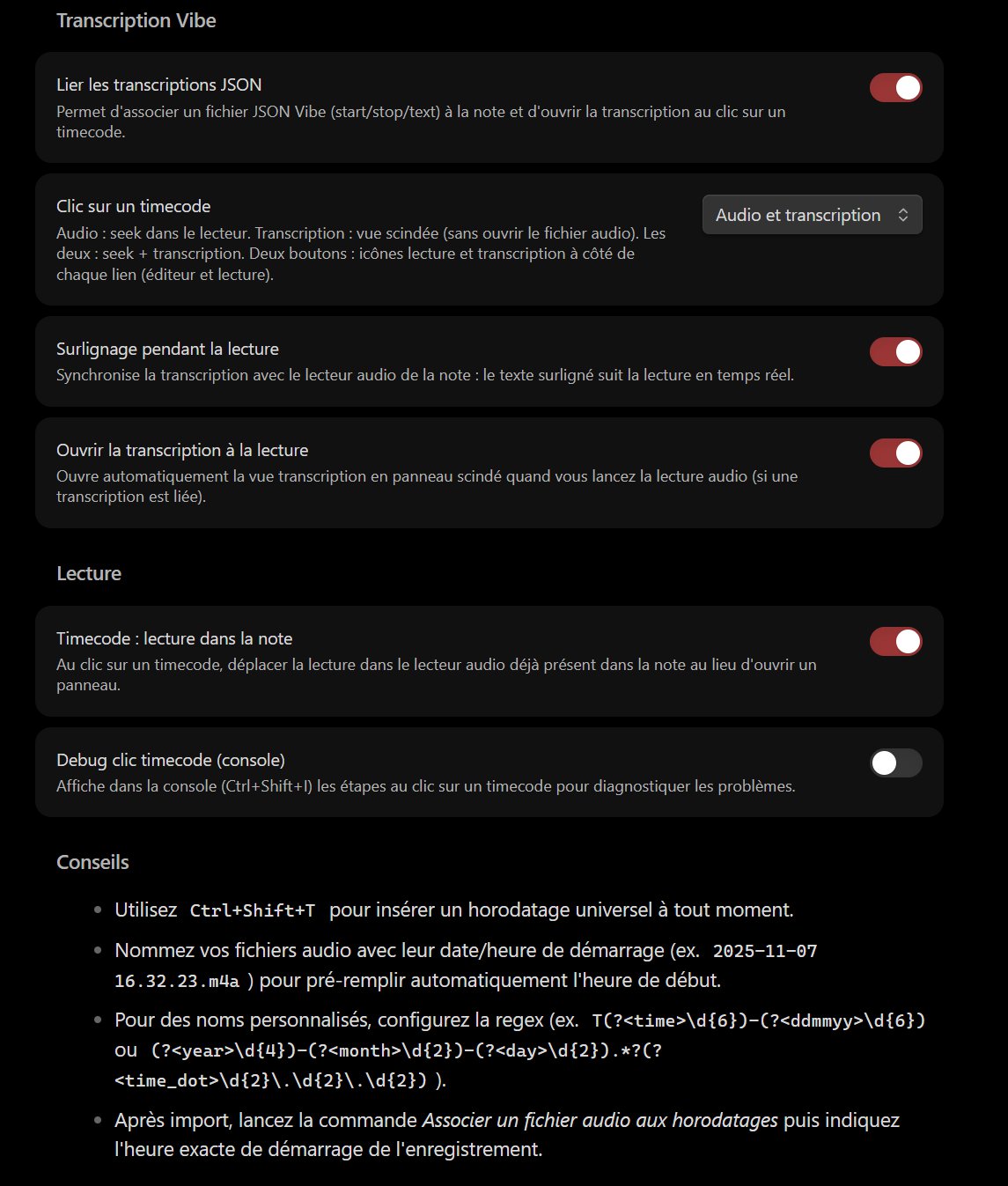
Si vous ajoutez un lien [[...]] vers un fichier audio reconnu, une fenêtre vous propose de lancer immédiatement la conversion (vous pouvez refuser et le faire plus tard).
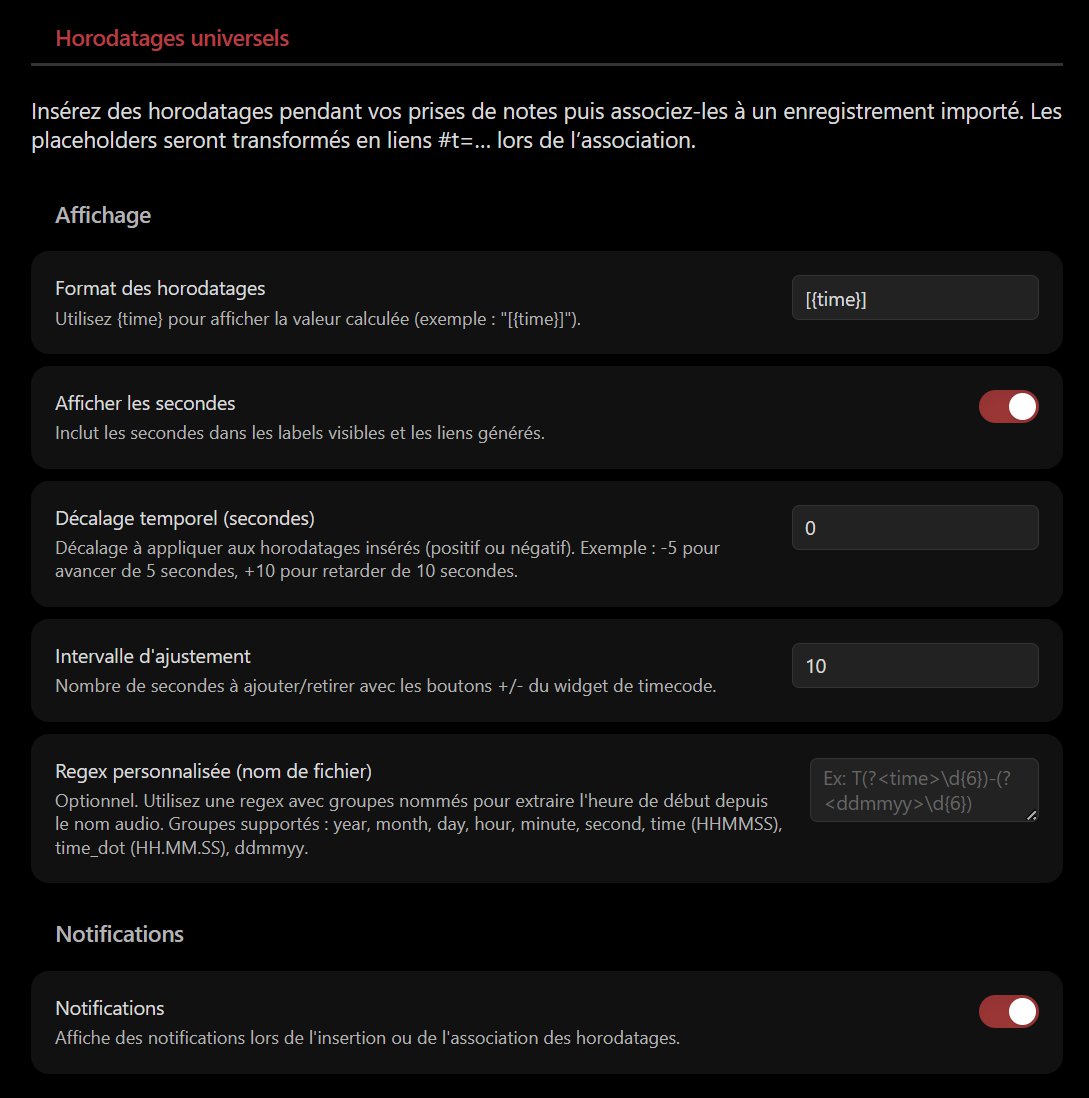
⚙️ Paramètres
- Format des horodatages : personnalisez l’affichage visible (
[{time}],({time}), etc.). - Afficher les secondes : active/désactive les secondes dans les libellés et les liens.
- Notifications : affiche des notifications lors de l’insertion et/ou de la conversion.
📋 Commandes disponibles
Insérer un horodatage universelAssocier un fichier audio aux horodatages
🔧 Développement
Prérequis
- Node.js 16+
- npm ou yarn
npm install
npm run dev
npm run build
📱 Compatibilité
| Plateforme | Statut |
|---|---|
| Windows Desktop | ✅ Supporté |
| macOS Desktop | ✅ Supporté |
| Linux Desktop | ✅ Supporté |
| Android | ✅ Supporté |
| iOS | ✅ Supporté |
Conformité catalogue Obsidian
| Élément | Détail |
|---|---|
| Licence | MIT — LICENSE |
| Réseau | non — horodatages locaux, fichiers audio dans le coffre uniquement |
| Fichiers hors vault | non |
| Télémétrie / mise à jour auto | non |
| Release | .\Release-Plugin.ps1 |
🙏 Remerciements
Inspiré par le plugin Media Extended, avec un focus sur l’indicateur d’enregistrement et la compatibilité mobile.
🔗 Ressources
| 🌐 l’Atelier | atelier.atechnologie.fr |
| 📦 Dépôt | github.com/Atelier-Recherche/Universal-Timestamp |
📸 Übersicht
📖 Über das Plugin
Ein Obsidian-Plugin zum Notieren während einer aufgenommenen Session (Audio oder Video) mit universellen Zeitstempeln auf Basis der Systemuhr. Nach dem Import der Aufnahme werden die Stempel in klickbare #t=-Links umgewandelt.
Hinweis: Das Plugin zeichnet kein Audio auf. Es konzentriert sich auf Notizen und Zeitsynchronisation mit einer externen Aufnahme. Unter Android eignet sich android-audio-recorder gut zum Aufnehmen.
🌟 Funktionen
- 📝 Universelle Zeitstempel:
Ctrl+Shift+Tfügt einen zeitgestempelten Marker (%%REC{...}%%) mit lesbarem Label ein. - 🔗 Kontrollierte Umwandlung: Befehl „Associate an audio file with timestamps“ / „Associer un fichier audio…“ wandelt Marker in Links
[[datei#t=123|[02:03]]]um. - 🔔 Kontextvorschlag: Wird ein Link zu einer Audiodatei in die Notiz eingefügt, kann das Plugin sofort die Umwandlung anbieten (nie erzwungen).
- 📂 Dateierkennung: automatische Erkennung von Audiodateien im Vault (MP3, WAV, M4A, OGG, WebM, MP4, AAC, FLAC).
- ⚙️ Schlanke Einstellungen: Label-Format
{time}, Sekunden an/aus, Benachrichtigungen.
⬇️ Installation über BRAT (1 Klick)
Plugin-ID (Obsidian-Katalog):
universal-timestamp— der Ordner unter.obsidian/plugins/mussuniversal-timestampheißen.
- 🔌 BRAT installieren: Obsidian — BRAT
- ➕ Dieses Repository mit „Add Beta plugin“ hinzufügen:
https://github.com/Atelier-Recherche/Universal-Timestamp
💡 Unsere Plugins können noch auf die Katalogprüfung warten; BRAT ermöglicht den sofortigen Test. Siehe auch 🌐 l’Atelier.
Manuelle Installation
main.js,manifest.jsonundstyles.cssherunterladen- Ordner
universal-timestampin.obsidian/plugins/anlegen - Dateien in diesen Ordner legen
- Obsidian neu starten
- Plugin in den Einstellungen aktivieren
🚀 Verwendung
1. Während des Notierens
- An jedem gewünschten Zeitmarker den Befehl „Insérer un horodatage universel“ / „Insert a universal timestamp“ ausführen (
Ctrl+Shift+Tstandardmäßig). - Ein Platzhalter wie
%%REC{"time":"2025-11-08T16:32:23.123Z"}%%[16:32:23]wird an der Cursorposition eingefügt.
2. Nach der Aufnahme
- Audio-/Videodatei in den Obsidian-Vault kopieren oder importieren.
- Enthält der Dateiname Startzeit/Datum (
2025-11-07 16.32.23.m4a), füllt das Plugin die Startzeit voraus.
3. Umwandlung der Zeitstempel
- Notiz mit Platzhaltern öffnen.
- Befehl „Associer un fichier audio aux horodatages“ ausführen.
- Audiodatei wählen.
- Startzeit bei Bedarf anpassen (
YYYY-MM-DD HH:mm:ss).
- Alle referenzierten Platzhalter werden durch klickbare
#t=-Links ersetzt.
Kontextuelle Vorschläge
Fügen Sie einen [[...]]-Link zu einer erkannten Audiodatei ein, bietet ein Dialog die sofortige Umwandlung an (Ablehnen und später möglich).
⚙️ Einstellungen
- Zeitstempel-Format: sichtbares Label anpassen (
[{time}],({time}), usw.). - Sekunden anzeigen: Sekunden in Labels und Links ein-/ausschalten.
- Benachrichtigungen: Hinweise beim Einfügen und/oder bei der Umwandlung.
📋 Verfügbare Befehle
Insérer un horodatage universel/Insert a universal timestampAssocier un fichier audio aux horodatages/Associate an audio file with timestamps
🔧 Entwicklung
Voraussetzungen
- Node.js 16+
- npm oder yarn
npm install
npm run dev
npm run build
📱 Kompatibilität
| Plattform | Status |
|---|---|
| Windows Desktop | ✅ Unterstützt |
| macOS Desktop | ✅ Unterstützt |
| Linux Desktop | ✅ Unterstützt |
| Android | ✅ Unterstützt |
| iOS | ✅ Unterstützt |
Katalogkonformität Obsidian
| Element | Detail |
|---|---|
| Lizenz | MIT — LICENSE |
| Netzwerk | nein — lokale Zeitstempel, Audiodateien nur im Vault |
| Dateien außerhalb des Vaults | nein |
| Telemetrie / Auto-Update | nein |
| Release | .\Release-Plugin.ps1 |
🙏 Danksagung
Inspiriert von Media Extended, mit Fokus auf Aufnahme-Hinweise und mobile Kompatibilität.
🔗 Ressourcen
| 🌐 l’Atelier | atelier.atechnologie.fr |
| 📦 Repository | github.com/Atelier-Recherche/Universal-Timestamp |
📸 Overview
📖 About
An Obsidian plugin for taking notes during a recorded session (audio or video) by generating universal timestamps based on the system clock. Once the recording is imported, timestamps are converted into clickable #t= links.
Note: the plugin does not record audio. It focuses on note-taking and time sync with an external recording. On Android, android-audio-recorder works well for recording.
🌟 Features
- 📝 Universal timestamps:
Ctrl+Shift+Tinserts a time-stamped marker (%%REC{...}%%) with a readable label. - 🔗 Controlled conversion: command “Associate an audio file with timestamps” turns markers into
[[file#t=123|[02:03]]]links. - 🔔 Contextual prompt: when an audio file link is inserted in the note, the plugin can offer to run conversion immediately (never forced).
- 📂 File recognition: automatic detection of audio files already in the vault (MP3, WAV, M4A, OGG, WebM, MP4, AAC, FLAC).
- ⚙️ Lean settings: label format
{time}, show/hide seconds, notifications.
⬇️ Install via BRAT (one click)
Plugin ID (Obsidian community):
universal-timestamp— the folder under.obsidian/plugins/must be nameduniversal-timestamp.
- 🔌 Install BRAT: Obsidian — BRAT
- ➕ Add this repo with “Add Beta plugin”:
https://github.com/Atelier-Recherche/Universal-Timestamp
💡 Our plugins may be pending Obsidian directory review; BRAT lets you try them now. See also 🌐 l’Atelier.
Manual install
- Download
main.js,manifest.json, andstyles.css - Create a
universal-timestampfolder in.obsidian/plugins/ - Place the downloaded files in that folder
- Restart Obsidian
- Enable the plugin in settings
🚀 Usage
1. While taking notes
- At each desired time cue, run “Insert a universal timestamp” (
Ctrl+Shift+Tby default). - A placeholder such as
%%REC{"time":"2025-11-08T16:32:23.123Z"}%%[16:32:23]is inserted at the cursor.
2. After recording
- Copy or import the audio/video file into your Obsidian vault.
- If the filename includes the start date/time (
2025-11-07 16.32.23.m4a, for example), the plugin will pre-fill the start time.
3. Converting timestamps
- Open the note containing your placeholders.
- Run “Associate an audio file with timestamps”.
- Choose the audio file to link.
- Adjust the start time if needed (
YYYY-MM-DD HH:mm:ss).
- All referenced placeholders are replaced with clickable
#t=links.
Contextual suggestions
If you add a [[...]] link to a recognized audio file, a dialog offers to convert immediately (you can decline and do it later).
⚙️ Settings
- Timestamp format: customize the visible label (
[{time}],({time}), etc.). - Show seconds: enable/disable seconds in labels and links.
- Notifications: show notices on insert and/or conversion.
📋 Available commands
Insert a universal timestampAssociate an audio file with timestamps
🔧 Development
Prerequisites
- Node.js 16+
- npm or yarn
npm install
npm run dev
npm run build
📱 Compatibility
| Platform | Status |
|---|---|
| Windows Desktop | ✅ Supported |
| macOS Desktop | ✅ Supported |
| Linux Desktop | ✅ Supported |
| Android | ✅ Supported |
| iOS | ✅ Supported |
Obsidian directory compliance
| Item | Detail |
|---|---|
| License | MIT — LICENSE |
| Network | no — local timestamps, audio files in the vault only |
| Files outside vault | no |
| Telemetry / auto-update | no |
| Release | .\Release-Plugin.ps1 |
🙏 Acknowledgements
Inspired by Media Extended, with a focus on the recording cue workflow and mobile compatibility.
🔗 Resources
| 🌐 l’Atelier | atelier.atechnologie.fr |
| 📦 Repository | github.com/Atelier-Recherche/Universal-Timestamp |
📸 Vista previa
📖 Acerca de
Un plugin de Obsidian para tomar notas durante una sesión grabada (audio o vídeo) generando marcas temporales universales basadas en el reloj del sistema. Una vez importada la grabación, las marcas se convierten en enlaces #t= clicables.
Nota: el plugin no graba audio. Se centra en la toma de notas y la sincronización temporal con una grabación externa. En Android, android-audio-recorder sirve bien para grabar.
🌟 Funciones
- 📝 Marcas temporales universales:
Ctrl+Shift+Tinserta un marcador con hora (%%REC{...}%%) y una etiqueta legible. - 🔗 Conversión controlada: el comando « Associer un fichier audio aux horodatages » / « Associate an audio file with timestamps » transforma los marcadores en enlaces
[[archivo#t=123|[02:03]]]. - 🔔 Propuesta contextual: al insertar un enlace a un archivo de audio, el plugin puede ofrecer lanzar la conversión de inmediato (nunca forzada).
- 📂 Reconocimiento de archivos: detección automática de archivos de audio en el vault (MP3, WAV, M4A, OGG, WebM, MP4, AAC, FLAC).
- ⚙️ Ajustes sencillos: formato de etiqueta
{time}, mostrar u ocultar segundos, notificaciones.
⬇️ Instalación vía BRAT (1 clic)
ID del plugin (catálogo Obsidian):
universal-timestamp— la carpeta en.obsidian/plugins/debe llamarseuniversal-timestamp.
- 🔌 Instalar BRAT: Obsidian — BRAT
- ➕ Añadir este repositorio con « Add Beta plugin »:
https://github.com/Atelier-Recherche/Universal-Timestamp
💡 Nuestros plugins pueden estar pendientes de validación en el catálogo de Obsidian; BRAT permite probarlos ya. Ver también 🌐 l’Atelier.
Instalación manual
- Descargue
main.js,manifest.jsonystyles.css - Cree la carpeta
universal-timestampen.obsidian/plugins/ - Coloque los archivos descargados en esa carpeta
- Reinicie Obsidian
- Active el plugin en los ajustes
🚀 Uso
1. Durante la toma de notas
- En cada marca temporal deseada, use el comando « Insérer un horodatage universel » / « Insert a universal timestamp » (
Ctrl+Shift+Tpor defecto). - Se inserta un marcador del tipo
%%REC{"time":"2025-11-08T16:32:23.123Z"}%%[16:32:23]en la posición del cursor.
2. Tras la grabación
- Copie o importe el archivo de audio/vídeo en su vault de Obsidian.
- Si el nombre del archivo incluye la fecha/hora de inicio (
2025-11-07 16.32.23.m4a, por ejemplo), el plugin rellenará automáticamente la hora de inicio.
3. Conversión de marcas temporales
- Abra la nota con los marcadores.
- Ejecute « Associer un fichier audio aux horodatages ».
- Elija el archivo de audio a vincular.
- Ajuste la hora de inicio si hace falta (
YYYY-MM-DD HH:mm:ss).
- Todos los marcadores referenciados se sustituyen por enlaces
#t=clicables.
Sugerencias contextuales
Si añade un enlace [[...]] a un archivo de audio reconocido, un diálogo ofrece lanzar la conversión de inmediato (puede rechazarla y hacerlo más tarde).
⚙️ Ajustes
- Formato de marcas temporales: personalice la etiqueta visible (
[{time}],({time}), etc.). - Mostrar segundos: activa/desactiva los segundos en etiquetas y enlaces.
- Notificaciones: muestra avisos al insertar y/o al convertir.
📋 Comandos disponibles
Insérer un horodatage universel/Insert a universal timestampAssocier un fichier audio aux horodatages/Associate an audio file with timestamps
🔧 Desarrollo
Requisitos previos
- Node.js 16+
- npm o yarn
npm install
npm run dev
npm run build
📱 Compatibilidad
| Plataforma | Estado |
|---|---|
| Windows Desktop | ✅ Compatible |
| macOS Desktop | ✅ Compatible |
| Linux Desktop | ✅ Compatible |
| Android | ✅ Compatible |
| iOS | ✅ Compatible |
Conformidad con el catálogo Obsidian
| Elemento | Detalle |
|---|---|
| Licencia | MIT — LICENSE |
| Red | no — marcas temporales locales, archivos de audio solo en el vault |
| Archivos fuera del vault | no |
| Telemetría / actualización automática | no |
| Release | .\Release-Plugin.ps1 |
🙏 Agradecimientos
Inspirado en Media Extended, con énfasis en el flujo de marcas durante la grabación y la compatibilidad móvil.
🔗 Recursos
| 🌐 l’Atelier | atelier.atechnologie.fr |
| 📦 Repositorio | github.com/Atelier-Recherche/Universal-Timestamp |