
PandocCit
Plugin Obsidian qui affiche dans le panneau latéral une liste de références formatée pour chaque clé de citation Pandoc ([@clef]) présente dans la note active.
Installer BRAT : Cliquez ici.
Ajouter notre plugin : Utilisez l’option « Add Beta plugin » avec l’URL GitHub.
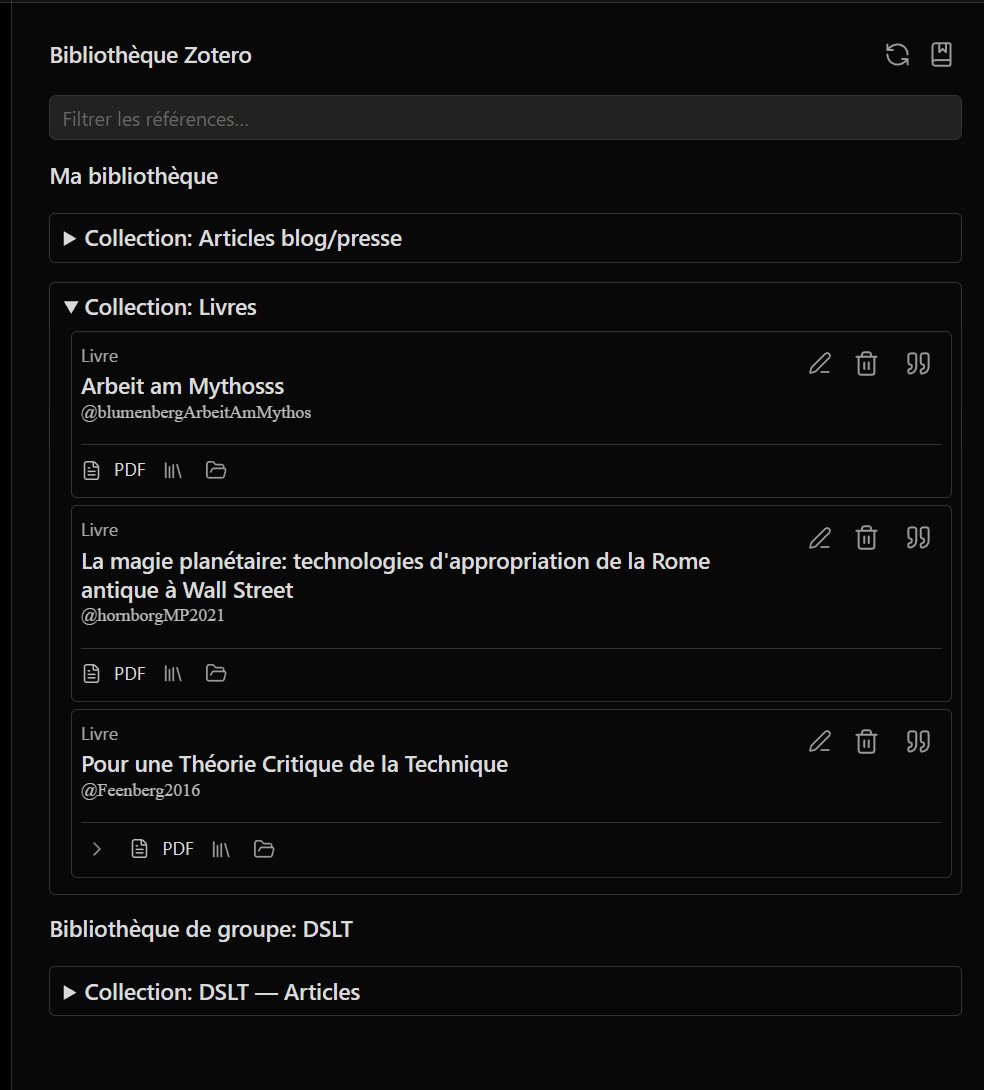
📸 Aperçu
| Liste des références | Bibliothèque |
|---|---|
 |
 |
📖 À propos
Affiche dans le panneau latéral une liste de références formatée pour chaque clé de citation Pandoc ([@clef]) présente dans la note active.
⬇️ Installation via BRAT (1 clic)
ID du plugin (catalogue Obsidian) :
pandocit— le dossier dans.obsidian/plugins/doit s’appelerpandocit(sans le motobsidiandans l’ID, conformément aux règles du manifest). Si vous migrez depuisobsidian-pandoc-reference-list, renommez le dossier ou réinstallez, puis copiezdata.jsonetpandoc.wasm.
- 🔌 Installer BRAT : Obsidian — BRAT
- ➕ Ajouter ce dépôt avec l’option « Add Beta plugin » :
https://github.com/Atelier-Recherche/pandocit
💡 Nos plugins peuvent être en attente de validation sur le catalogue Obsidian ; BRAT permet de les tester dès maintenant. Voir aussi 🌐 l’Atelier.
⚙️ Fonctionnement
- 🦀 Le plugin utilise Pandoc 3.9 en WebAssembly (
pandoc.wasm) pour convertir les fichiers de bibliographie (BibTeX, etc.) en CSL JSON. Aucune installation de Pandoc sur le système n’est nécessaire. - 📱 Compatible Obsidian bureau (Windows, macOS, Linux) et mobile (Android, iOS) : le même plugin fonctionne sur ordinateur, téléphone et tablette.
🔧 Configuration
-
📚 Bibliographie
Indiquez le chemin vers votre fichier de bibliographie (compatible Pandoc :.bib,.jsonCSL, etc.).- 🖥️ Sur bureau : bouton de sélection ou chemin absolu / relatif au coffre.
- 📱 Sur mobile : chemin relatif au coffre (ex.
refs/bibliographie.bib). La boîte « ouvrir un fichier » n’est disponible que sur bureau.
-
🎨 Style de citation (CSL) (optionnel)
Liste intégrée ou fichier.csl(chemin ou URL), éventuellement surchargé par le frontmatter (bibliography,csl,lang, etc.). -
📋 Panneau des références
Palette de commandes : « PandoCit : Show reference list » (libellé selon la langue Obsidian). - 🌐 Langue du plugin (optionnel)
Dans les réglages du plugin : langue des libellés (paramètres, notices, panneau latéral).
📚 Zotero (optionnel)
🔗 Better BibTeX / flux local
L’intégration Better BibTeX et le réseau local convient surtout à Obsidian bureau. Sur mobile, préférez une bibliographie fichier dans le coffre.
☁️ Zotero Web API
Une fois activée dans les réglages :
- 🔑 Clé API et bibliothèque personnelle ou de groupe (ID numérique).
- 👥 Fusion de bibliothèques de groupe : IDs de groupes + Charger les groupes ou noms d’affichage personnalisés (une ligne par ID + libellé).
- 🔄 Synchronisation bidirectionnelle (modèle Zotero API).
- 📤 Export BibTeX optionnel vers un
.bibdans le coffre (Pandoc, LaTeX, Typst).
Les données sont stockées en JSON dans le dossier du plugin ; aucun Node local Zotero n’est requis — usage hors ligne possible après synchro.
🌳 Panneau « Bibliothèque »
Commande : « Open library panel » / « Ouvrir le panneau bibliothèque ».
Vue arborescente (collections, éléments sans classe, pièces isolées, corbeille). Filtre, édition des notices (notes HTML Zotero), pièces jointes PDF / fichiers sur la ligne.
- ▸ Sous-arbre replié par défaut : icône chevron dans la bande des pièces jointes pour afficher / masquer les enfants.
- 🏷️ Badges de type (livre, article…) selon la langue d’interface du plugin.
Commande « Sync Zotero library (Web API) » pour actualiser après la première synchro.
📥 Import d’un dossier PDF vers Zotero
Commande « Importer un dossier PDF vers Zotero » (panneau bibliothèque ou palette) : scan récursif d’un dossier du coffre, détection des doublons, clés de citation suggérées (auteur + année + initiales du titre), collections « longs » / « courts » PDF, pièce jointe liée au coffre ou téléversée. Réglages : dossier par défaut, motifs d’exclusion, regex sur les noms de fichiers.
📄 Lecteur PDF intégré
- Ouverture des PDF via le coffre dans le lecteur Obsidian natif.
- Surlignage dans le PDF et/ou Zotero (API Web), avec styles mémorisés et menu contextuel.
- Panneau annotations : liste unifiée (PDF, Zotero), copie de référence Pandoc (
> texte, lien Obsidian,[@citekey]). - Synchronisation des surlignages avec les pièces jointes Zotero liées au fichier du coffre.
📗 Lecteur EPUB intégré
- Lecteur foliate-js dans Obsidian (navigation, surlignage local).
- Fichier sidecar d’annotations à côté de l’EPUB.
- Début de liaison Zotero (lecture / envoi d’annotations si pièce jointe EPUB reconnue) — voir roadmap ci-dessous.
📝 Hypothesis (optionnel)
Token API et groupe dans les réglages. Import des annotations Hypothesis vers le panneau document (EPUB) ; export des annotations locales vers Hypothesis. Interface masquée si non configuré.
🗺️ Roadmap (synthèse)
État actuel : citations Pandoc + Zotero API + PDF sont les plus matures ; EPUB et Hypothesis ont une base fonctionnelle à affiner.
| Priorité | EPUB | Hypothesis | Autres pistes |
|---|---|---|---|
| Court terme | Panneau annotations aligné sur le PDF ; notes Zotero (HTML) depuis la bibliothèque ; stabilité surlignage ↔ Zotero (CFI) | Jeux de tests (URI coffre, groupe public/privé, aller-retour import/export) ; messages d’erreur plus explicites | Import dossier PDF : affiner filtres et retours utilisateur |
| Moyen terme | Recherche dans le livre ; préférences typographie ; conversion cible PDF ↔ Zotero comme pour le PDF | Sélecteurs riches (pas seulement citation textuelle) ; lien avec pages PDF si même ouvrage | Copier référence depuis annotations EPUB comme pour le PDF |
| Long terme | Parité fonctionnelle PDF/EPUB (overlay, mobile) | Workflow de revue de littérature (sync planifiée, conflits) | Plugin catalogue Obsidian ; tests CI étendus ; assets PDF locaux sans CDN |
EPUB — détail
- [x] Lecteur foliate, sidecar, toolbar de base
- [x] Lecture annotations Zotero existantes ; envoi highlight vers Zotero (API)
- [ ] Édition / affichage des notes Zotero liées à l’EPUB
- [ ] Surlignage fluide avec synchro bidirectionnelle fiable
- [ ] Intégration complète au panneau « Annotations du document »
- [ ] Tests sur gros fichiers et mobile
Hypothesis — détail
- [x] Token + groupe ; import API search ; export POST
- [ ] Tests systématiques (PDF annoté dans le navigateur, EPUB, URIs multiples)
- [ ] Robustesse réseau et quotas API
- [ ] Harmonisation avec le flux Zotero (éviter doublons, choix de source)
Autres idées
- Insertion de citation (commande palette) : recherche élégante sur la bibliographie déjà chargée (titre, auteur, clé), aperçu formaté citeproc, choix du format d’insertion (
[@clef], note inline^[…], etc.) — sans exiger Zotero installé ; le flux BBT/CAYW reste un raccourci optionnel pour qui l’utilise déjà, pas une dépendance du plugin. - Renommage de clé de citation : modifier une
citekey(import PDF, bibliothèque Zotero, notice) et proposer de mettre à jour toutes les occurrences dans le coffre ([@ancienne],@ancienne, liens[[@…]], notes de bas de page, etc.) avec aperçu des fichiers touchés avant validation. - Recherche globale dans les annotations (tous documents ouverts récemment).
- Export groupé des références d’une session de lecture.
- Rappel de synchronisation Zotero avant export
.bib. - Support Typst / modèles de notes de lecture depuis les annotations.
Les cases cochées reflètent l’état du dépôt à la date de la doc ; la roadmap peut évoluer sur GitHub Issues.
💻 Développement et build
yarn install
yarn build
En CI / release, yarn install --frozen-lockfile utilise un cache Yarn local au runner (évite les corruptions du cache global ~/.cache/yarn).
Le build produit notamment :
main.js(bundle ; non versionné — fourni par les releases GitHub)manifest.json,styles.csspdf.worker.min.mjs,foliate-view.mjs(optionnels dans le coffre ; worker embarqué dansmain.js, lecteur EPUB téléchargeable depuis les réglages)pdf-assets/,foliate/(générés au build, non versionnés ;foliate/sert au bundlefoliate-view.mjs)
Déploiement local (Windows) :
.\Deploy-LocalPlugin.ps1Copie main.js, manifest.json, styles.css, pdf.worker.min.mjs et foliate-view.mjs vers le dossier plugin Obsidian (préserve data.json et pandoc.wasm).
Release : .\Release-Plugin.ps1 incrémente la version, build, commit, tag et push ; la workflow release publie uniquement main.js, manifest.json et styles.css (exigence du catalogue Obsidian). Le worker PDF est inclus dans main.js ; un téléchargement optionnel de pdf.worker.min.mjs est proposé dans les réglages du plugin (comme pour pandoc.wasm).
Dans le coffre, installez aussi pandoc.wasm via les réglages du plugin (obligatoire pour les bibliographies non-JSON).
⚠️ Limitations connues (WASM)
Pandoc WASM tourne dans un bac à sable : pas d’accès réseau arbitraire ni d’exécution de commandes système. Ce plugin n’utilise que la conversion bibliographie → CSL JSON.
Revue catalogue Obsidian — comportements intentionnels
Les contrôles automatisés peuvent signaler des accès qui restent nécessaires au fonctionnement desktop (pas de contournement sans perte de features) :
| Signalement | Raison |
|---|---|
Accès filesystem (fs) |
Pièces jointes Zotero liées, bibliographies / cache CSL hors coffre, Better BibTeX en local |
| Presse-papiers | Copie de citations et de références d’annotations |
| Énumération du coffre | Résolution de PDF/EPUB et chemins flous |
Modules Node (fs / path / crypto) et electron |
Uniquement derrière Platform.isDesktop (fichiers hors coffre, hash MD5 d’upload Zotero, sélecteur de fichier, presse-papiers HTML) |
Le plugin vise aussi mobile pour la lecture / sync API ; les chemins Node restent gardés bureau.
Accès réseau
Les requêtes du plugin passent par requestUrl d’Obsidian ; seul pdf.js charge lui-même ses ressources depuis unpkg. Aucune télémétrie, aucune publicité.
| Service | Quand |
|---|---|
127.0.0.1:23119 (Better BibTeX, local) |
Si la source bibliographique Zotero / Better BibTeX est activée |
api.zotero.org |
Si une clé API Zotero est configurée (lecture / écriture de la bibliothèque, pièces jointes) |
raw.githubusercontent.com (styles et locales CSL) |
Au premier usage d’un style ou d’une langue de citation non mis en cache |
github.com (pandoc.wasm, lecteur EPUB) |
Uniquement sur clic d’installation dans les réglages |
unpkg.com (pdf.js : polices standard, WASM, profils ICC) |
À l’ouverture d’un PDF dans le lecteur intégré (le worker est embarqué ; téléchargement séparé seulement sur clic) |
hypothes.is |
Uniquement si l’import Hypothesis est utilisé |
🔗 Ressources
| 🌐 l’Atelier | atelier.atechnologie.fr |
| 📦 Dépôt | github.com/Atelier-Recherche/pandocit |
| 📄 Pandoc | pandoc.org — Releases / pandoc.wasm 3.9 |
| 🎓 CSL | citationstyles.org |
📸 Vorschau
| Referenzliste | Bibliothek |
|---|---|
|
|
📖 Überblick
Zeigt in der Seitenleiste eine formatierte Referenzliste für jeden Pandoc-Zitierschlüssel ([@schlüssel]) in der aktiven Notiz.
⬇️ Installation über BRAT (1 Klick)
- 🔌 BRAT installieren: Obsidian — BRAT
- ➕ Dieses Repository mit „Add Beta plugin“ hinzufügen:
https://github.com/Atelier-Recherche/pandocit
💡 Unsere Plugins können noch auf die Validierung im Obsidian-Katalog warten; mit BRAT können Sie sie sofort testen. Siehe auch 🌐 l’Atelier.
⚙️ Funktionsweise
- 🦀 Das Plugin nutzt Pandoc 3.9 WebAssembly (
pandoc.wasm), um Bibliographie-Dateien (BibTeX usw.) in CSL JSON zu konvertieren. Keine systemweite Pandoc-Installation nötig. - 📱 Kompatibel mit Obsidian Desktop (Windows, macOS, Linux) und Mobil (Android, iOS): dasselbe Plugin auf Computer, Smartphone und Tablet.
🔧 Konfiguration
-
📚 Bibliographie
Pfad zur Bibliographie-Datei (Pandoc-kompatibel:.bib, CSL-.jsonusw.).- 🖥️ Desktop: Dateiauswahl oder absoluter / vault-relativer Pfad.
- 📱 Mobil: nur vault-relativer Pfad (z. B.
refs/bibliographie.bib). Der Dateidialog ist nur auf dem Desktop verfügbar.
-
🎨 Zitierstil (CSL) (optional)
Integrierte Liste oder.csl-Datei (Pfad oder URL), ggf. per Frontmatter überschreibbar (bibliography,csl,langusw.). -
📋 Referenzpanel
Befehlspalette: „PandoCit : Show reference list“ (Bezeichnung je nach Obsidian-Oberflächensprache). - 🌐 Plugin-Sprache (optional)
In den Plugin-Einstellungen: Sprache der Beschriftungen (Einstellungen, Eintragseditor, eigene Seitenleiste).
📚 Zotero (optional)
🔗 Better BibTeX / lokaler Feed
Die Integration mit Better BibTeX und dem lokalen Netzwerk eignet sich vor allem für Obsidian Desktop. Auf Mobilgeräten lieber eine Bibliographie-Datei im Vault.
☁️ Zotero Web API
Nach Aktivierung in den Einstellungen:
- 🔑 API-Schlüssel und persönliche oder Gruppen-Bibliothek (numerische ID).
- 👥 Gruppenbibliotheken zusammenführen: Gruppen-IDs + Gruppen laden oder eigene Anzeigenamen (eine Zeile pro ID + Bezeichnung).
- 🔄 Bidirektionale Synchronisation (Zotero-API-Modell).
- 📤 Optionaler BibTeX-Export in eine
.bib-Datei im Vault (für Pandoc, LaTeX, Typst).
Die Daten werden als JSON im Plugin-Ordner gespeichert; keine lokale Zotero-Node-Installation — Offline-Nutzung des Vaults nach der Synchronisation möglich.
🌳 Panel „Bibliothek“
Befehl: „Open library panel“ / „Bibliotheksbereich öffnen“.
Baumansicht (Sammlungen, nicht eingeordnete Einträge, einzelne Anhänge, Papierkorb). Filter, Bearbeitung der Einträge (inkl. Zotero-HTML-Notizen), PDF-/Datei-Anhänge in der Zeile.
- ▸ Unterbaum standardmäßig eingeklappt: Chevron in der Anhangsleiste zum Ein- und Ausklappen der Kinder.
- 🏷️ Typ-Badges (Buch, Zeitschriftenartikel …) folgen der Plugin-Oberflächensprache, sofern unterstützt.
Befehl „Sync Zotero library (Web API)“ zum Aktualisieren nach der ersten Synchronisation.
💻 Entwicklung und Build
Voraussetzungen: Node.js und Yarn.
yarn install
yarn build
Erzeugt main.js im Projektroot. Zum Testen im Vault nach .obsidian/plugins/<plugin-name>/ kopieren:
main.jsmanifest.jsonstyles.css(falls vorhanden)pandoc.wasm(erforderlich für Nicht-JSON-Bibliographien)
⚠️ Bekannte Einschränkungen (WASM)
Pandoc WASM läuft in einer Sandbox: kein beliebiger Netzwerkzugriff, keine Systembefehle. Dieses Plugin nutzt nur die Konvertierung Bibliographie → CSL JSON.
🔗 Ressourcen
| 🌐 l’Atelier | atelier.atechnologie.fr |
| 📦 Repository | github.com/Atelier-Recherche/pandocit |
| 📄 Pandoc | pandoc.org — Releases / pandoc.wasm 3.9 |
| 🎓 CSL | citationstyles.org |
📸 Preview
| Reference list | Library |
|---|---|
|
|
📖 About
Shows a formatted reference list in the sidebar for each Pandoc citation key ([@key]) in the active note.
⬇️ Install via BRAT (one click)
Plugin ID (Obsidian community) :
pandocit— the folder under.obsidian/plugins/must be namedpandocit(IDs cannot containobsidian; see Manifest guidelines). Migrating fromobsidian-pandoc-reference-list? Rename the folder or reinstall, then copydata.jsonandpandoc.wasm.
- 🔌 Install BRAT: Obsidian — BRAT
- ➕ Add this repo with “Add Beta plugin”:
https://github.com/Atelier-Recherche/pandocit
💡 Our plugins may still be pending Obsidian community review; BRAT lets you try them now. See also 🌐 l’Atelier.
⚙️ How it works
- 🦀 Uses Pandoc 3.9 WebAssembly (
pandoc.wasm) to convert bibliography files (BibTeX, etc.) to CSL JSON. No system Pandoc install required. - 📱 Works on Obsidian desktop (Windows, macOS, Linux) and mobile (Android, iOS).
🔧 Configuration
-
📚 Bibliography
Path to your bibliography file (Pandoc-compatible:.bib, CSL.json, etc.).- 🖥️ Desktop: file picker or absolute / vault-relative path.
- 📱 Mobile: vault-relative path only (e.g.
refs/library.bib). File dialog is desktop-only.
-
🎨 Citation style (CSL) (optional)
Built-in list or.cslfile (path or URL); overridable via note frontmatter (bibliography,csl,lang, etc.). -
📋 Reference panel
Command palette: “PandoCit : Show reference list” (label depends on Obsidian UI language). - 🌐 Plugin language (optional)
Plugin settings: UI language for labels (settings, item editor, dedicated sidebar).
📚 Zotero (optional)
🔗 Better BibTeX / local feed
Better BibTeX and local network sync work best on desktop. On mobile, prefer a bibliography file in the vault.
☁️ Zotero Web API
When enabled in settings:
- 🔑 API key and personal or group library (numeric ID).
- 👥 Merge group libraries: group IDs + Load groups or custom display names (one line per ID + label).
- 🔄 Bidirectional sync (Zotero API model).
- 📤 Optional BibTeX export to a vault
.bib(for Pandoc, LaTeX, Typst).
Data is stored as JSON in the plugin folder; no local Zotero Node install — offline vault use after sync.
🌳 “Library” panel
Command: “Open library panel”.
Tree view (collections, unfiled items, standalone attachments, trash). Filter, edit items (including Zotero HTML notes), PDF / file attachments on each row.
- ▸ Collapsed subtrees by default: chevron in the attachment strip to expand / collapse children.
- 🏷️ Type badges (book, journal article…) follow the plugin UI language when supported.
Use “Sync Zotero library (Web API)” to refresh after the first sync.
📥 Import vault PDF folder to Zotero
Command “Import vault PDF folder to Zotero”: recursive scan, duplicate detection, suggested citation keys (author + year + title initials), long/short PDF collections, linked or uploaded attachments. Settings: default folder, exclusion patterns, filename regex.
📄 Built-in PDF reader
- Open PDFs from the vault in Obsidian’s native PDF reader.
- Highlights to PDF and/or Zotero (Web API), saved styles, context menu.
- Annotations panel: unified list, Pandoc reference copy (
> quote, Obsidian link,[@citekey]). - Sync with Zotero attachments linked to vault files.
📗 Built-in EPUB reader
- foliate-js reader in Obsidian (navigation, local highlights).
- Annotation sidecar next to the EPUB.
- Early Zotero linking (read/push highlights when EPUB attachment is matched) — see roadmap below.
📝 Hypothesis (optional)
API token and group in settings. Import Hypothesis annotations into the document panel (EPUB); export local annotations to Hypothesis. UI hidden when not configured.
🗺️ Roadmap (summary)
Today: Pandoc citations + Zotero API + PDF are the most mature; EPUB and Hypothesis have a working base that still needs polish.
| Priority | EPUB | Hypothesis | Other |
|---|---|---|---|
| Short term | Annotations panel parity with PDF; Zotero HTML notes from library; reliable highlight ↔ Zotero (CFI) | Test matrix (vault URIs, groups, round-trip import/export); clearer errors | Vault PDF import UX |
| Medium term | In-book search; typography prefs; PDF-like Zotero targets | Rich selectors; same work on web/PDF | Copy reference from EPUB annotations |
| Long term | PDF/EPUB feature parity (overlay, mobile) | Scheduled sync, conflict handling | Obsidian community listing; broader CI tests; offline PDF assets |
EPUB
- [x] Foliate reader, sidecar, basic toolbar
- [x] Read Zotero annotations; push highlights via API
- [ ] Zotero notes on EPUB items
- [ ] Smooth bidirectional highlight sync
- [ ] Full document annotations panel integration
- [ ] Large files & mobile testing
Hypothesis
- [x] Token + group; import search API; export POST
- [ ] Systematic tests (browser PDF, EPUB, multiple URIs)
- [ ] Network resilience and API limits
- [ ] Alignment with Zotero flow (dedup, source choice)
Other ideas
- Global search across recent document annotations.
- Batch export of reading-session references.
- Zotero sync reminder before
.bibexport. - Reading-note templates from annotations (Typst, etc.).
Checkboxes reflect the repo at doc update time; track changes on GitHub Issues.
💻 Development and build
yarn install
yarn build
CI/release uses yarn install --frozen-lockfile with a runner-local Yarn cache.
Build outputs include:
main.js(bundle; not in git — see GitHub releases)manifest.json,styles.csspdf.worker.min.mjs,foliate-view.mjs(optional in the vault; worker embedded inmain.js; EPUB reader downloadable from settings)pdf-assets/,foliate/(build outputs, not in git;foliate/is used to producefoliate-view.mjs)
Local deploy (Windows): .\Deploy-LocalPlugin.ps1 — copies main.js, manifest.json, styles.css, pdf.worker.min.mjs, and foliate-view.mjs to your vault plugin folder (keeps data.json and pandoc.wasm).
Release: .\Release-Plugin.ps1 bumps version, builds, commits, tags, pushes; .github/workflows/release.yml publishes only main.js, manifest.json, and styles.css (Obsidian community requirement). The PDF worker is embedded in main.js; optional pdf.worker.min.mjs download is in plugin settings (like pandoc.wasm).
Install pandoc.wasm from plugin settings in the vault (required for non-JSON bibliographies).
⚠️ Known limitations (WASM)
Pandoc WASM runs in a sandbox: no arbitrary network or shell commands. This plugin only uses bibliography → CSL JSON conversion.
Obsidian review — disclosures
Automated checks may flag access that is required for desktop features:
| Flag | Reason |
|---|---|
Filesystem (fs) |
Linked Zotero attachments, bibliographies / CSL cache outside the vault |
| Clipboard | Copying citations and annotation references |
| Vault enumeration | Resolving PDF/EPUB files and fuzzy paths |
Node modules (fs / path / crypto) and electron |
Only behind Platform.isDesktop (files outside the vault, MD5 hash for Zotero uploads, file picker, HTML clipboard) |
The plugin also targets mobile for reading and API sync; Node code paths stay desktop-only.
Network use
Plugin requests go through Obsidian’s requestUrl; only pdf.js loads its own assets from unpkg. No telemetry, no ads.
| Service | When |
|---|---|
127.0.0.1:23119 (Better BibTeX, local) |
When the Zotero / Better BibTeX bibliography source is enabled |
api.zotero.org |
When a Zotero API key is configured (library read/write, attachments) |
raw.githubusercontent.com (CSL styles and locales) |
On first use of a citation style or language that is not cached |
github.com (pandoc.wasm, EPUB reader) |
Only when clicking an install button in settings |
unpkg.com (pdf.js standard fonts, WASM, ICC profiles) |
When opening a PDF in the built-in reader (the worker is bundled; separate download only on click) |
hypothes.is |
Only when Hypothesis import is used |
🔗 Resources
| 🌐 l’Atelier | atelier.atechnologie.fr |
| 📦 Repository | github.com/Atelier-Recherche/pandocit |
| 📄 Pandoc | pandoc.org — Releases / pandoc.wasm 3.9 |
| 🎓 CSL | citationstyles.org |
📸 Vista previa
| Lista de referencias | Biblioteca |
|---|---|
|
|
📖 Acerca de
Muestra en el panel lateral una lista de referencias formateada para cada clave de cita Pandoc ([@clave]) presente en la nota activa.
⬇️ Instalación vía BRAT (1 clic)
- 🔌 Instalar BRAT: Obsidian — BRAT
- ➕ Añadir este repositorio con « Add Beta plugin »:
https://github.com/Atelier-Recherche/pandocit
💡 Nuestros plugins pueden estar pendientes de validación en el catálogo de Obsidian; BRAT permite probarlos de inmediato. Véase también 🌐 l’Atelier.
⚙️ Funcionamiento
- 🦀 El plugin utiliza Pandoc 3.9 WebAssembly (
pandoc.wasm) para convertir archivos de bibliografía (BibTeX, etc.) a CSL JSON. No hace falta instalar Pandoc en el sistema. - 📱 Compatible con Obsidian de escritorio (Windows, macOS, Linux) y móvil (Android, iOS): el mismo plugin en ordenador, teléfono y tableta.
🔧 Configuración
-
📚 Bibliografía
Ruta al archivo de bibliografía (compatible con Pandoc:.bib,.jsonCSL, etc.).- 🖥️ En escritorio: selector de archivos o ruta absoluta / relativa al cofre.
- 📱 En móvil: ruta relativa al cofre (p. ej.
refs/bibliografia.bib). El cuadro «abrir archivo» solo está en escritorio.
-
🎨 Estilo de cita (CSL) (opcional)
Lista integrada o archivo.csl(ruta o URL), eventualmente sobrescrito por el frontmatter (bibliography,csl,lang, etc.). -
📋 Panel de referencias
Paleta de comandos: « PandoCit : Show reference list » (etiqueta según el idioma de Obsidian). - 🌐 Idioma del plugin (opcional)
En los ajustes del plugin: idioma de las etiquetas (ajustes, editor de fichas, panel lateral dedicado).
📚 Zotero (opcional)
🔗 Better BibTeX / flujo local
La integración con Better BibTeX y la red local conviene sobre todo en Obsidian de escritorio. En móvil, preferir un archivo de bibliografía en el cofre.
☁️ Zotero Web API
Una vez activada en los ajustes:
- 🔑 Clave API y biblioteca personal o de grupo (ID numérico).
- 👥 Fusión de bibliotecas de grupo: IDs de grupo + Cargar grupos o nombres de visualización personalizados (una línea por ID + etiqueta).
- 🔄 Sincronización bidireccional (modelo API Zotero).
- 📤 Exportación BibTeX opcional a un
.biben el cofre (Pandoc, LaTeX, Typst).
Los datos se almacenan en JSON en la carpeta del plugin; no se requiere Node local de Zotero — uso sin conexión del cofre tras la sincronización.
🌳 Panel « Biblioteca »
Comando: « Open library panel » / « Abrir panel de biblioteca ».
Vista en árbol (colecciones, elementos sin clasificar, adjuntos sueltos, papelera). Filtro, edición de fichas (notas HTML Zotero), adjuntos PDF / archivos en la fila.
- ▸ Subárbol plegado por defecto: icono chevron en la franja de adjuntos para mostrar / ocultar hijos.
- 🏷️ Insignias de tipo (libro, artículo…) según el idioma de interfaz del plugin.
Comando « Sync Zotero library (Web API) » para actualizar tras la primera sincronización.
💻 Desarrollo y compilación
yarn install
yarn build
Genera main.js en la raíz. Para probar en un cofre Obsidian, copiar en .obsidian/plugins/<nombre-del-plugin>/:
main.jsmanifest.jsonstyles.css(si existe)pandoc.wasm(obligatorio para bibliografías no JSON)
⚠️ Limitaciones conocidas (WASM)
Pandoc WASM se ejecuta en un entorno aislado: sin acceso de red arbitrario ni comandos del sistema. Este plugin solo usa la conversión bibliografía → CSL JSON.
🔗 Recursos
| 🌐 l’Atelier | atelier.atechnologie.fr |
| 📦 Repositorio | github.com/Atelier-Recherche/pandocit |
| 📄 Pandoc | pandoc.org — Releases / pandoc.wasm 3.9 |
| 🎓 CSL | citationstyles.org |